
How to Sign Up for Pump.fun in 2026 (With Referral Code NEWUSER50)
To sign up for Pump.fun, open pump.fun/join/NEWUSER50, click log in, and connect a Solana wallet or use email/social login. Pick a username, deposit some SOL, and you can start trading or launching coins. Using the join link applies the referral code NEWUSER50 automatically.
Who this guide is for
This guide is written for people who have never used Pump.fun and may be new to Solana. We will cover every step, from choosing how to log in to making your first deposit, and point out the safety checks that matter. If you already have a Solana wallet, you can skip straight to the section on opening the join link. The pump fun app referral code works the same on desktop and mobile.
Pump.fun is a popular place to create and trade memecoins. Creating an account is quick, but it gives you direct access to very volatile assets, so take a few minutes to understand what you are signing up for.
Option 1: Sign up with a Solana wallet
A self-custody wallet gives you full control of your funds. The most common choices are Phantom, Solflare and Backpack. Install one from the official store, create a new wallet, and write down the recovery phrase on paper. Never type that phrase into any website, including Pump.fun; you only approve connections and transactions inside the wallet itself.
Once your wallet is ready, open the join link in the same browser (or inside the wallet's built-in browser on mobile). Click "log in" or "connect wallet", pick your wallet, and approve the connection. This shares only your public address.
Option 2: Sign up with email or social login
Pump.fun also offers login methods that create an embedded wallet for you, using email or a social account. This is simpler for beginners because there is no separate app to manage, but you should still enable any security features offered and learn how to export or back up the wallet if the option exists. For the current status, see our verified NEWUSER50 referral code page.
| Self-custody wallet | Email / social login | |
|---|---|---|
| Setup time | 5–10 minutes | 1–2 minutes |
| Control of keys | Full | Managed by login provider |
| Best for | Regular crypto users | First-time users |
| Referral code | Applied via join link | Applied via join link |
Step-by-step sign-up
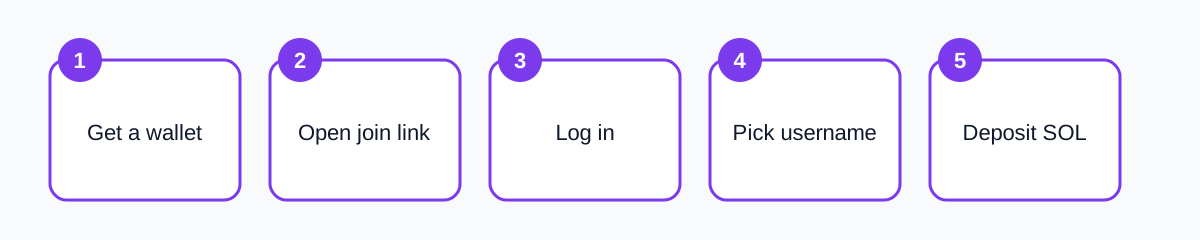
- Open https://pump.fun/join/NEWUSER50.
- Click Log in (top right).
- Choose wallet, email or social login and approve.
- If asked for a referral code, enter NEWUSER50.
- Choose a username and, optionally, a profile picture.
- Accept the terms after reading them.
- Deposit SOL to your wallet address.
That is it. Your account is active and linked to the referral. For more detail on the code itself, see how to use NEWUSER50.
Funding your account with SOL
Pump.fun runs on Solana, so trades are paid in SOL. You can buy SOL on a centralized exchange and withdraw it to your wallet address, or buy directly inside some wallets using a card. Always send a small test amount first and double-check that you chose the Solana network for the withdrawal; sending on the wrong network can mean losing the funds. Always apply the pump fun referral code before your first login.
How much should you deposit? Only what you can afford to lose. Many beginners start with the equivalent of a few dollars to learn how buying, selling and fees work before risking more. Keep a little SOL aside for network fees, which are tiny but required for every transaction.
Security checklist
- Bookmark the real pump.fun address and use the bookmark.
- Ignore direct messages offering help, airdrops or "support".
- Never share your recovery phrase or private key.
- Read every wallet approval before signing.
- Use a separate wallet for memecoin trading, keeping long-term savings elsewhere.
- Check regional rules; Pump.fun may restrict access in some countries.
Scams on memecoin platforms are common, and most of them rely on tricking users into signing something or visiting a fake site. Slowing down for a few seconds before each approval prevents most of them.
After you sign up: what next?
Spend some time browsing before you trade. Look at how coins move on the bonding curve, read the comments with healthy skepticism, and check how many holders a coin has and whether the creator holds a large share. Read our fees guide so you know what each trade costs, and our app guide if you prefer trading on your phone. If you have not signed up yet, grab the pumpfun referral code on our main page first.
If you like the platform and want to invite others, Pump.fun lets you create your own referral link. Our article on referral rewards explains how that works.
Signing up on mobile vs desktop
Both work equally well, but the experience differs. On desktop, a browser extension wallet like Phantom pops up a window to approve each action, which makes it easy to read what you are signing. On mobile, you either use the Pump.fun app with email login or open the site inside your wallet's built-in browser. In both cases, start from the join link so the pumpfun referral code is stored before you log in.
| Desktop | Mobile | |
|---|---|---|
| Wallet | Browser extension | Wallet app browser or app login |
| Readability of approvals | High | Medium |
| Speed for quick trades | Good | Excellent |
| Referral code | Open join link first | Tap join link first |
Understanding the Pump.fun interface after sign-up
When you log in for the first time, the homepage shows a feed of coins, often sorted by recent activity or market cap. Each coin card shows the name, ticker, image, creator and a progress indicator toward graduation from the bonding curve. Clicking a coin opens its page with a price chart, a buy and sell panel, a list of holders and a comment thread. You can copy the pump fun app referral code and the join link in one click.
Spend time on the holder list. If a single wallet, especially the creator's, owns a large percentage, that wallet can sell and crash the price. A wide spread of holders is not a guarantee of anything, but heavy concentration is a warning sign. Treat the comment thread as entertainment rather than advice; it is full of people promoting coins they already own.
Setting sensible limits from day one
Before your first trade, decide on three numbers: the total amount you are willing to put on Pump.fun, the most you will put into any single coin, and the loss at which you will stop for the day. Writing these down sounds simple, but it is the most effective protection against the fast, emotional decisions that memecoin platforms encourage.
Many experienced users keep their Pump.fun wallet completely separate from their savings wallet, and only top it up with a fixed amount each month. If the trading wallet is ever compromised or the balance goes to zero, the damage is limited.
Sign-up problems and fixes
- The wallet does not connect: refresh the page, unlock the wallet, and make sure it is set to the Solana network.
- No referral field appears: that is normal; the join link stores NEWUSER50 in the background.
- Username taken: add numbers or choose another name; it can usually be changed later.
- Deposit not showing: confirm the transaction on a Solana explorer using your wallet address.
- Region blocked: respect the restriction; using workarounds can lead to frozen accounts.
Glossary for new Pump.fun users
- SOL: the native token of Solana, used to pay for trades and fees.
- Wallet: software that holds your keys and signs transactions.
- Recovery phrase: 12 or 24 words that restore your wallet; never share it.
- Bonding curve: the pricing formula new Pump.fun coins trade on.
- Graduation: when a coin leaves the bonding curve and moves to a DEX.
- Slippage: the maximum price movement you accept during a trade.
- Referral code: an identifier, such as NEWUSER50, that links your new account to a referrer.
Knowing these terms makes the rest of the platform much easier to understand, and it helps you spot when someone is using jargon to make a bad deal sound good. If you see a term you do not recognise in a coin description or chat, look it up before you act on it. Confusion is one of the main tools scammers rely on.
Key takeaway
The order matters more than anything else: open the join link with the pumpfun referral code first, then log in, then deposit. Get that right and the rest of the sign-up is straightforward and fully reversible except for the referral itself.
Summary
Signing up for Pump.fun takes a few minutes: open the join link, log in with a wallet or email, set a username and deposit SOL. Using pump.fun/join/NEWUSER50 applies the referral code automatically and costs you nothing. For the current code and quick facts, visit our Pump.fun referral code page.
Ready? Get the code on our Pump.fun referral code page.
Frequently asked questions
Do I need KYC to use Pump.fun?
Pump.fun generally does not require identity verification for basic use, but rules can change and some regions are restricted.
Which wallet is best for Pump.fun?
Phantom, Solflare and Backpack are popular Solana wallets that work with Pump.fun.
Can I sign up without a wallet?
Yes, email or social login creates an embedded wallet for you.
When should I enter the referral code?
Before your first login, by opening pump.fun/join/NEWUSER50.