
How to Use the Pump.fun Referral Code NEWUSER50 (Step-by-Step 2026)
To use the Pump.fun referral code NEWUSER50, open pump.fun/join/NEWUSER50 before you create or connect your account. The link stores the code automatically, so after you connect a wallet and make your first trade, your account is linked to the referral. It is free and takes about five minutes.
What a referral code actually does
A referral code is a short label that tells a platform who introduced a new user. On Pump.fun, the code is embedded in a join link: when you visit pump.fun/join/NEWUSER50, the site remembers the code in your browser session and attaches it to the account you connect next. Nothing about your wallet, your balance or your trading changes because of it. The only difference is that the platform now knows which referrer brought you in, and it can credit that referrer under its referral program. If you have not signed up yet, grab the pump fun referral code on our main page first.
That matters for a simple reason: referral attribution almost always happens once, at the moment an account is first registered. If you have already connected a wallet to Pump.fun without the code, the system has usually already recorded you as a direct sign-up. That is why the most important rule in this whole guide is to open the referral link first, before you do anything else on the site.
People sometimes worry that a referral code is a trick that raises their costs. It is not. Trading fees on Pump.fun are set by the platform and are the same for referred and non-referred users. The referrer is paid out of the platform's own share, not from an extra charge on your trades.
Before you start: what you need
You need three things. First, a device with a modern browser or the Pump.fun app. Second, a way to sign in: a Solana wallet such as Phantom, Solflare or Backpack, or the email and social login options Pump.fun offers for newcomers. Third, a small amount of SOL, the native token of the Solana blockchain, to pay for trades and network fees.
If you do not have a wallet yet, install one from the official app store or the wallet's official website, never from a link in a comment or direct message. Write your recovery phrase on paper and store it offline. Anyone with that phrase controls your funds, and no legitimate service, including Pump.fun, will ever ask you for it.
| Requirement | Why | Example |
|---|---|---|
| Browser or app | Access pump.fun | Chrome, Safari, Pump.fun app |
| Wallet or login | Create your account | Phantom, Solflare, email |
| SOL balance | Pay for trades and fees | 0.1–0.5 SOL to start |
| Referral link | Attach NEWUSER50 | pump.fun/join/NEWUSER50 |
Step-by-step: using NEWUSER50 on the website
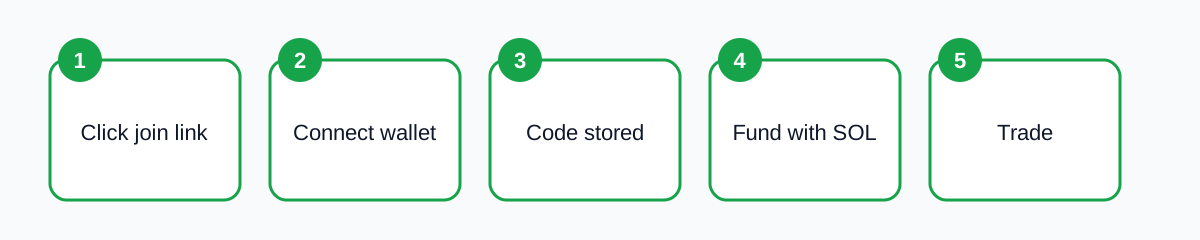
- Open the join link. Go to https://pump.fun/join/NEWUSER50. Make sure the address bar shows pump.fun and not a look-alike domain.
- Click to log in or connect. Choose your wallet or the email option. Approve the connection request in your wallet; it only shares your public address.
- Check for a referral field. If a box asks for a referral or invite code, type NEWUSER50 in capitals with no spaces. In most cases it is already filled in from the link.
- Set up your profile. Pick a username if asked. This is public, so avoid using your real name.
- Deposit SOL and trade. Send SOL to your wallet and make your first trade. Your account is now linked to the referral.
The whole process usually takes less than five minutes. The only step people skip is the first one, and that is the one that matters most. You can copy the pumpfun referral code and the join link in one click.
Step-by-step: using NEWUSER50 in the Pump.fun app
The mobile experience follows the same logic. Before opening the app for the first time, tap the join link on your phone. If the app is installed, your phone may offer to open it directly; if not, the link opens in your browser and points you to the store listing. Install the app, then return to the link once more so the referral is picked up when the app launches.
Inside the app, sign in with email, a social account or a connected wallet. If you see an invite or referral code field during onboarding, enter NEWUSER50. If you do not see one, that is normal: the code is passed through the link. You can read more about the mobile flow in our Pump.fun app guide.
How to check the code was applied
Pump.fun does not always show a big confirmation banner, so it helps to know where to look. After signing in, open your profile or the referral section in settings. Many accounts show who referred them or show a referral dashboard of their own. If you created a brand-new account through the join link, the referral was recorded at that moment. The pump fun app referral code works the same on desktop and mobile.
If you are unsure, the safest approach is simply to make sure you used the link before your very first connection. There is no way for a third-party site such as ours to view or change your account, so we cannot confirm it for you. What we can do is keep the code and link on our Pump.fun referral code page up to date.
Common mistakes to avoid
- Connecting first, clicking the link later. Referrals are normally assigned at sign-up. Open the link first.
- Typos. The code is NEWUSER50: N-E-W-U-S-E-R-5-0, all capitals, no spaces or dashes.
- Using a fake domain. Scam sites copy the Pump.fun design. Check the address bar for pump.fun.
- Private or incognito tabs closing. If the tab with the link closes before you connect, the stored code can be lost. Re-open the link.
- Sharing your seed phrase. No step in this process requires it. Anyone asking is trying to steal your funds.
Most problems with referral codes come from one of these five issues, and all of them are easy to avoid once you know about them.
Is it worth using a referral code at all?
Using a code costs you nothing and takes no extra time if you do it at the start, so there is no downside. You get the same platform, the same fees and the same features. The referrer may receive a share of platform fees, which is how independent guides like this one can keep writing detailed, free tutorials. For the current status, see our verified NEWUSER50 referral code page.
What a referral code cannot do is make memecoin trading safe. Pump.fun is a launchpad where thousands of new tokens appear every day, and the majority lose most of their value. Treat any money you put in as high risk, start with a small amount, and learn how the bonding curve and fees work first. Our article on Pump.fun fees is a good next step.
Using NEWUSER50 on desktop vs mobile: quick comparison
| Situation | What to do |
|---|---|
| New user on desktop | Open pump.fun/join/NEWUSER50, then connect your wallet in the same tab. |
| New user on phone browser | Tap the link, log in with email or a wallet browser. |
| New user in the app | Tap the link before the first app login; enter NEWUSER50 if a field appears. |
| Existing account | The code usually cannot be added; you can still share your own link. |
A practical tip: if you plan to use a wallet's built-in browser on mobile, such as the browser inside Phantom, copy the join link and paste it into that browser rather than opening it in Safari or Chrome. That way the referral is stored in the same environment where you will actually connect your wallet.
Why we verify the pumpfun referral code regularly
Referral codes can stop working if an account is closed, a program changes, or a link format is updated. That is why we re-check the pumpfun referral code NEWUSER50 and its join link on a regular schedule and show the last-checked date at the top of our Pump.fun referral code page. If a code ever stops working, the most likely sign is that the join link redirects to the plain homepage without storing anything; in that case, check back on our page for an updated code before you sign up. Always apply the pump fun referral code before your first login.
We also avoid publishing claims we cannot confirm, such as specific bonus amounts, because Pump.fun sets and changes its own terms. What stays constant is the process: link first, sign in second, trade third.
Summary
To recap: the pump fun referral code is NEWUSER50, the join link is pump.fun/join/NEWUSER50, it works on both the website and the app, and it must be used before your first sign-in. It is free, it does not change your fees, and you can confirm it in your profile. For the latest status of the code, check our Pump.fun referral code page, which we re-verify regularly.
Ready? Get the code on our Pump.fun referral code page.
Frequently asked questions
Do I need to type NEWUSER50 manually?
Usually not. Opening pump.fun/join/NEWUSER50 stores it automatically. Type it only if a referral field appears and is empty.
Can I use NEWUSER50 on an existing account?
Generally no. Referrals are attached when an account is first created or connected.
Is the code case-sensitive?
Enter it as NEWUSER50 in capitals to be safe.
Does the code cost anything?
No. Your fees are the same with or without a referral code.